Twitch Chat Overlay
Show your Twitch Chat Overlay as a Browser Source in OBS.
Your Twitch Chat Overlay comes with 10 pre-made styles you can tune yourself. Change the colors and fonts (over 1000 to choose from!), tweak anything else you like and make it fully yours. Not a single line of code needed: it just works.
Works with
Shows emotes from

What your chat does
One command. Three things happen.
-
quietfox: that jump was insanepixelmoth: gg
Chat talks
Like they always do.
-
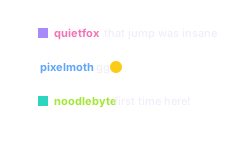
Live chat shows in your overlay
All badges and emotes are supported, including 7TV, BTTV and FFZ.
-
10looks13controls
Change it while you're live
Comes with a full designer
Every change shows up in your Twitch Chat overlay straight away.
Why streamers use it
The Twitch Chat Overlay that just works.
Nothing to connect, ready in minutes
No bot and no account to link. This Twitch Chat Overlay reads your chat directly, the same way any viewer does. Paste it into your streaming software and you're live.
Ten styles to start from
From a retro terminal to speech bubbles to a news ticker, pick the Twitch Chat Overlay that fits your stream. Then make it yours with your own font, colours and layout.
Every emote, every badge
Twitch emotes plus 7TV, BTTV and FFZ, along with the badges your chatters have earned. Your community sees itself on stream exactly as it appears in chat.
Follows your mods, shows what you want
When a mod deletes a message or times someone out, it leaves your overlay too. Hide commands that start with !, and keep chosen accounts, like other bots, off screen.
Make it yours
Ten looks to start from.
Pick one in the designer, then tune the font, colours, layout and how long a message stays.
Start from
Accent
That's 3 of the designer's 13 controls. It also has: Layout · How long a message stays · Font · Emote size · Names in their Twitch colours · Background · Badges · Hiding commands and bots · Your own saved looks.
Open the full designerFree. One click installs it, and the designer opens from the same page.
Clean. Glass rows, everyone in their own Twitch color. The one you never regret.
Ready in two steps
From this page to your stream.
Every step is a button on the next page. You never have to go looking for a setting.
-
1
Get Twitch Chat Overlay
Log in with Twitch. One click puts it in your account.
-
2
Add it to OBS
Copy one link into a Browser Source. Streamlabs Desktop and any other app with a browser source work the same way.
The feed fills whatever box you give it in OBS. 500 by 800 is a good start for a stacked feed, 1920 by 80 for the ticker.
Questions
Before you click.
Do deleted messages disappear?
Yes. When a moderator deletes a message or times someone out, it comes off your overlay too.
Can I hide commands or certain chatters?
Yes. You can hide messages that start with ! and hide chosen accounts, like other bots.
Do my viewers need to do anything?
No. They chat like they always do.
Which emote services are supported?
All Twitch emotes, plus 7TV, BTTV and FFZ. They work out of the box, with zero extra setup.
Can I use my own font?
Every font on fonts.bunny.net is one click away. If yours isn't there, a bit of CSS makes it fully yours. Not sure how? Ask an AI to do it for you.
Can I suggest changes, additions or design presets?
Absolutely. Join the Overlabels Discord and post in #integration-suggestions. The Discord is still very new, but you can talk to the Overlabels developer there directly.
Is it really free?
Yes. Overlabels has no tiers, no trial and no card to enter. Every product is free.
Can I remove it later?
Yes. One button on the product's page removes it and everything it installed.
Get your Twitch Chat Overlay
Free. Two steps.
Works with
Shows emotes from
More things your chat can do