Chat Tower
Your chat builds one tower together.
Viewers type !stack and a block lands on top. Every block lands a little off the one below, the tower sways more as it grows, and sooner or later someone knocks it over.
Works with
What your chat does
One command. Three things happen.
-
quietfox: !stackpixelmoth: !stack left
Chat stacks a block
Aim it left or right to fight the lean.
-
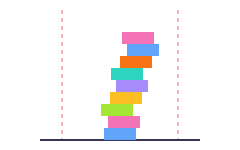
The tower sways as it grows
Both fall lines are on screen, so chat sees it coming.
-
overlabels: The tower fell at 23. tea_and_raids placed the last block. Record stands at 31.
Someone knocks it over
Whoever placed the last block gets named.
Why streamers use it
One tower, built by your whole chat.
Everyone builds the same thing
One tower for the whole chat. Every block is somebody's, and it only gets tall if chat works together.
A record to chase
The tallest tower ever stays on record, and everyone who had a block in it lands in a list any overlay can show.
The fall is part of the show
The tower leans, sways and finally comes down on screen. Chat can see exactly how close it is.
Fresh each stream, or left standing
The tower comes down at the start of every stream, or stays up between streams if you'd rather. The record carries over either way.
Ready in three steps
From this page to your stream.
Every step is a button on the next page. You never have to go looking for a setting.
-
1
Get Chat Tower
Log in with Twitch. One click puts it in your account.
-
2
Switch on the bot
One button turns on the Overlabels bot, which reads
!stackin your chat. Type/mod overlabelsin your chat so it can reply. -
3
Add it to OBS
Copy one link into a Browser Source. Streamlabs Desktop and any other app with a browser source work the same way.
Blocks only land while you are live. Anyone can type !tower to see how tall it is and how close it is to falling.
Questions
Before you click.
What happens to whoever knocks it over?
Nothing, apart from being named in chat and on screen.
Can one viewer spam it?
No. Each viewer waits a few seconds between blocks, 5 by default, and you can make that longer.
Does the record reset?
No. The record and the list of who built it carry over from stream to stream.
Do my viewers need to sign up for anything?
No. They type in your Twitch chat, like any other chat command.
Is it really free?
Yes. Overlabels has no tiers, no trial and no card to enter. Every product is free.
Can I remove it later?
Yes. One button on the product's page removes it and everything it installed.
Give your chat something to build tonight.
Free. Three steps.
Works with
More things your chat can do