Follower Bowling
Your newest followers become bowling pins.
Your ten newest followers are racked up as pins, with their avatars and names. Chat types !bowl to get in line, and the lane rolls the next viewer down every fifteen seconds.
Works with
What your chat does
One command. Three things happen.
-
quietfox: !bowlnoodlebyte: !bowl
Chat gets in line
One
!bowland you are in the queue. -
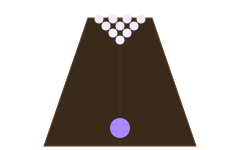
The ball rolls by itself
Every fifteen seconds, the next viewer bowls.
-
STRIKE!all ten followers down
Pins fall, the score shows
A strike says STRIKE. A gutter says GUTTER.
Why streamers use it
A bowling lane made of your followers.
New followers get a moment
Following your channel puts someone on your stream as a pin, with their avatar and name.
It runs itself
Switch the lane on and it bowls every fifteen seconds while there's a line. You keep streaming.
On screen only when you want
The lane stays hidden until you switch it on, so it can sit in OBS all stream.
Mods can call the next bowler
!fbfirst sends the next one in line and !fbdraw picks one at random.
Ready in three steps
From this page to your stream.
Every step is a button on the next page. You never have to go looking for a setting.
-
1
Get Follower Bowling
Log in with Twitch. One click puts it in your account.
-
2
Switch on the bot
One button turns on the Overlabels bot, which reads
!bowlin your chat. Type/mod overlabelsin your chat so it can reply. -
3
Add it to OBS
Copy one link into a Browser Source. Streamlabs Desktop and any other app with a browser source work the same way.
Switch the lane on from the overlay's Controls tab when you want it on screen. It runs itself from there.
Questions
Before you click.
Who are the pins?
Your ten newest followers, with their avatars and names.
Does the bot fill chat with messages?
No. While the lane runs, the bot stays quiet. The score is on the overlay.
Can mods skip the line?
Yes. !fbfirst sends the next person in line and !fbdraw picks one at random. You can rename both under Settings, Bot aliases.
Do my viewers need to sign up for anything?
No. They type in your Twitch chat, like any other chat command.
Is it really free?
Yes. Overlabels has no tiers, no trial and no card to enter. Every product is free.
Can I remove it later?
Yes. One button on the product's page removes it and everything it installed.
Roll your newest followers tonight.
Free. Three steps.
Works with
More things your chat can do